

Smart Glossary
Carry Names, Terms, and Gender Guidance From Chapter 1 to Chapter 1,000
In raw MTL, one character can appear under several names, cultivation realms mutate between chapters, and pronouns flip inside the same scene. Build one project glossary that travels with the whole story.

The problem
You caught up to the raws. The terminology did not.
Long web novels punish short memory. A surname becomes a given name fifty chapters later. A sect rank gets translated three different ways. A character who was clearly established in one scene receives the wrong pronoun in the next. By the time you notice, the chapter is asking you to remember which version was real.
That drift is especially painful when you are reading MTL because the raw text may be consistent even when the output is not. The Smart Glossary gives recurring story language a project-level home, so your choices are not trapped in the chapter where you first made them.
It is built for serial reading: the moment when you are caught up, a new raw drops, and you want the next chapter without re-litigating the cast's naming choices.
How it works
Three steps, one memory for the project
- 01
Detect recurring entities
Turn on entity extraction and each imported chapter is checked for characters, terms, and locations. New findings are synced into the project glossary instead of disappearing after that chapter.
- 02
Review the details
The optional review step shows the original text, detected type, translated name, and, for character entries, gender. Edit translated names and character genders before translation. When adding an entry yourself, choose its type as well.
- 03
Apply it at translation time
Normal translations, resumed translations, and AutoTL Next automatically include the glossary entries relevant to the chapter. You can refine entries later from the Glossary page. If a translated word slips through, Recovery can find its likely source term and add the confirmed mapping.
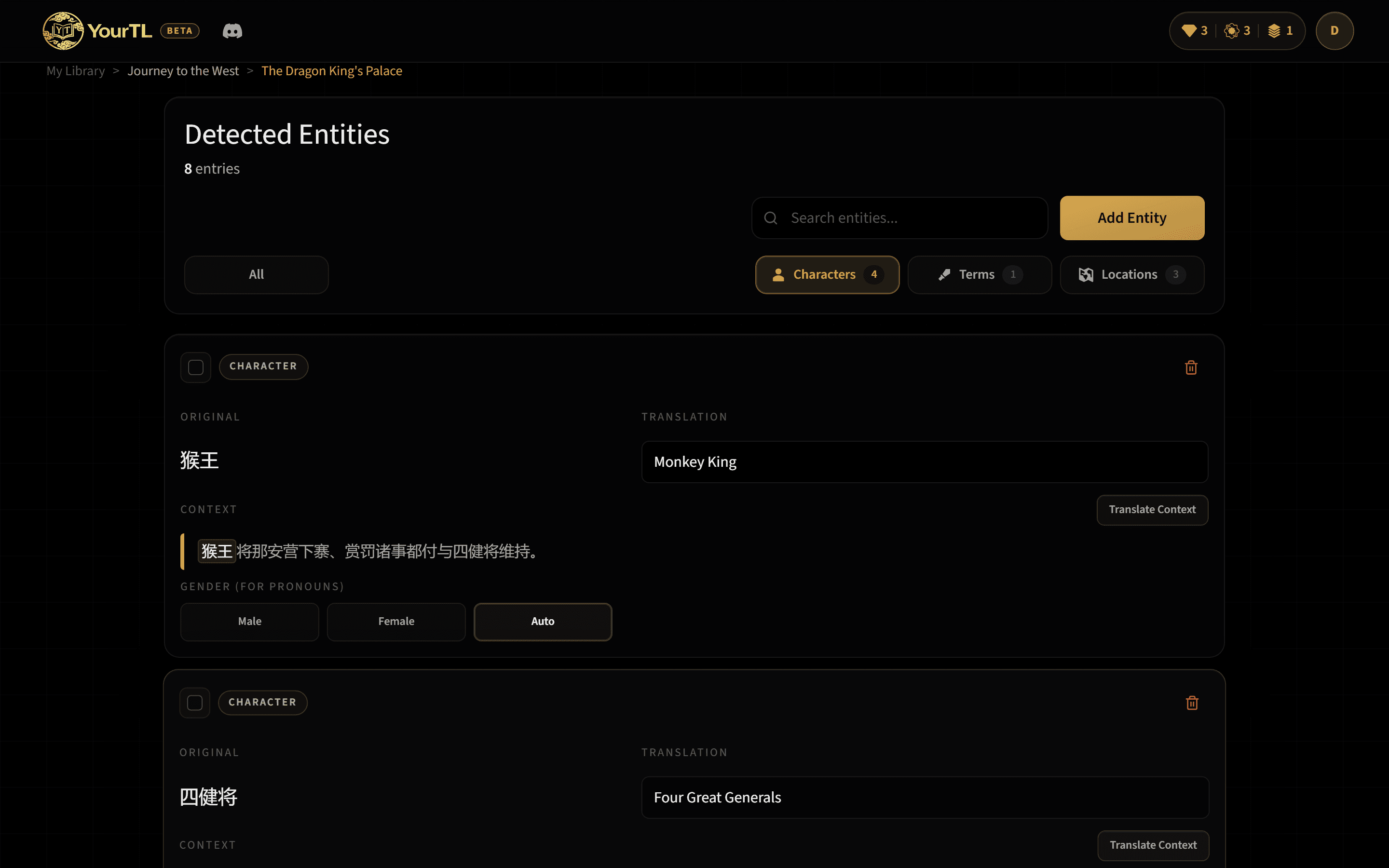
Genders & pronouns
Pronoun guidance that stays with the character
When a character from your glossary appears in a chapter, their stored gender guides pronoun choice in that translation. Gender guidance applies only to character entries, and you can correct the stored value during review or from the Glossary page.
Fanfiction
Start with the canon context
Fanfiction projects link one or more source works. Those selections give entity extraction canon context, helping it prefer established character and setting names before your project glossary grows chapter by chapter.
Learn more →Smart Glossary FAQ
Before you trust it with a thousand chapters
- Does the glossary fill itself?
- When entity extraction is enabled, each imported chapter is checked for characters, terms, and locations. New findings are synced to the project glossary, and the optional review step lets you check them before translation.
- Can I change an entry later?
- Yes. From the Glossary page, you can update an existing translated name and, for character entries only, gender. You can also add a new entry with its source term, translation, and type, plus gender when it is a character.
- Will a glossary edit rewrite finished chapters?
- No. The revised entry guides future translations in that project. A previously saved chapter keeps its current text unless you open and edit it yourself.
- How does gender help with pronouns?
- When a character from your glossary appears in a chapter, their stored gender guides pronoun choice in that translation. Gender guidance applies only to character entries, and you remain in control of the stored value.
- What if an important term was missed?
- Use Recovery after translation. Select the translated word, review the likely original source term found from the chapter context, and add the confirmed mapping to the project glossary.
Give the story one memory.
Start free, translate a real chapter, and see how your project glossary carries its names and terms forward.