

Source Sites
How to find the original chapter of a translated web novel
Go from an English title to the right chapter on the original site: title and author first, then the platform, then the chapter list.
The short version
- Find the original title and the author's name.
- Check both on the platform where the novel was first published.
- Open its table of contents and find the chapter by its title, not only its number.
- Bring that chapter to YourTL with the import method that fits it.
1. Find the original title and author
A translated novel can go by several English titles: the official one, a fan translation's, an abbreviation, or a different spelling. The original title and the author's name stay the same, so collect both before you search.
They usually appear on the official English edition's page, which credits the author, in encyclopedia or fan-wiki entries about the series, and in the "Associated Names" field of database sites such as NovelUpdates. A translator's release page often names the original as well.
If you only have a translated title or a link, ask an AI assistant for the original title, the author's name, and a link to the original platform. Treat its answer as a lead and check that the title and author match on that platform.
Reader comments may also mention the original title. Still stuck? You can ask the YourTL Discord community for help; include the translated title and the page where you found the story.
Then search the original title with one useful word added:
- Chinese: add 作者 (author) or the platform's name, as in 诡秘之主 作者 or 诡秘之主 起点 for Lord of the Mysteries.
- Japanese: add the platform's name, as in 本好きの下剋上 小説家になろう for Ascendance of a Bookworm.
- Korean: add 원작 소설 (original novel) to separate the novel from its webtoon, or a platform name, as in 전지적 독자 시점 네이버 시리즈 for Omniscient Reader's Viewpoint.
Searching a title with "raw" mostly turns up repost sites. A platform name, or the platform's own search box, leads to the original more reliably.
2. Confirm the work on its original platform
The original platform is where the author published the chapters first. Chinese web novels often come from Qidian (起点中文网), JJWXC (晋江文学城), or Fanqie (番茄小说); Japanese ones from Syosetu (小説家になろう) or Kakuyomu (カクヨム); Korean ones from KakaoPage (카카오페이지), Naver Series (네이버 시리즈), Munpia (문피아), or Novelpia (노벨피아).
On the work's page, check that the title and the author both match. Syosetu shows the author after 作者, Naver Series after 글, and JJWXC puts both in the page title as 《title》author.
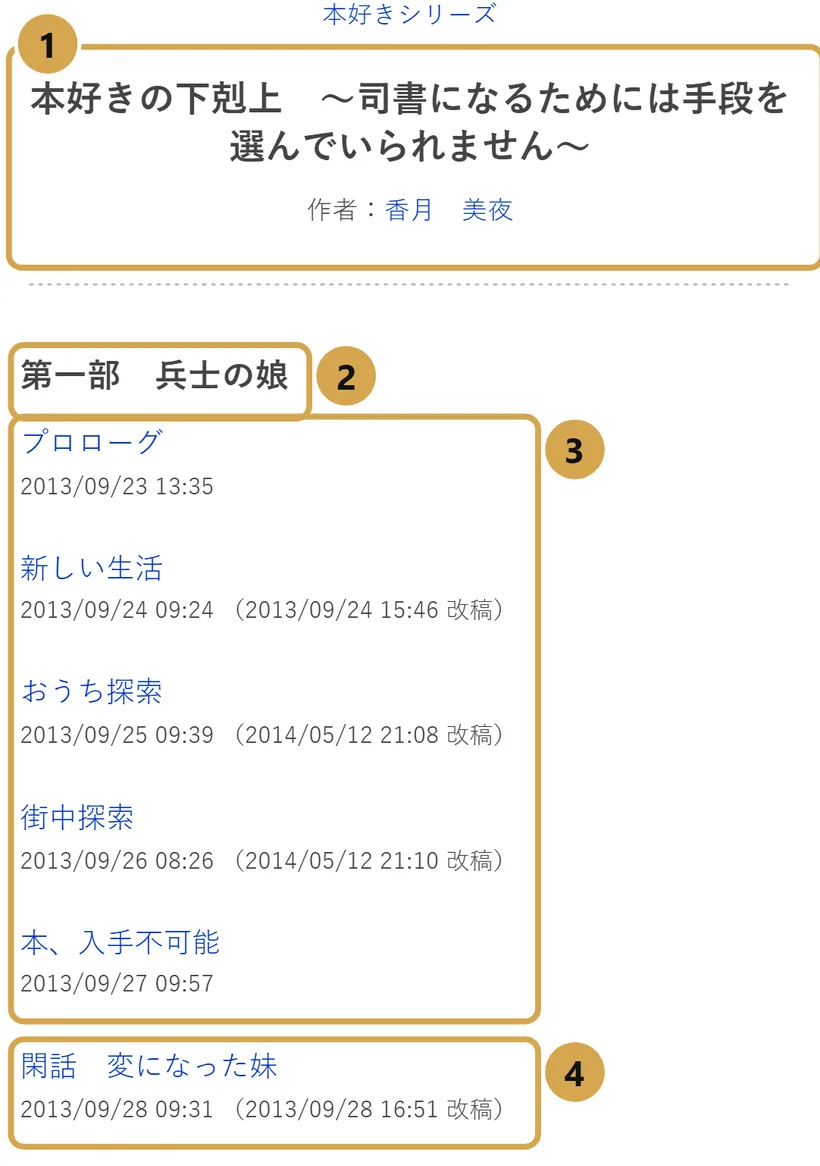
Then make sure it is the version your translation follows:
- Web novel or book. A web novel can change when it becomes a book. J-Novel Club notes that one volume of Ascendance of a Bookworm adds content that is not in the web novel, and the official English Mushoku Tensei translates the published light novel, not the Syosetu version.
- Serial or book edition. Naver Series can sell the same title as a serial counted in episodes (화) and as a book edition counted in volumes (권).
- Similar titles. Sequels and side stories share most of a title: 無職転生 - 蛇足編 - is a separate work from 無職転生 - 異世界行ったら本気だす -.
3. Find the next chapter in the table of contents
Open the table of contents (目录 in Chinese, 目次 in Japanese). Use the chapter number to get close to where you stopped, then compare titles to find the last chapter you read. If you don't read the original language, use your browser's translation tool or Google Translate; the wording may differ from your usual translation.
If you are still unsure, translate a short opening passage to check the match. Once you have found the last chapter you read, take the entry after it.
Numbers are a weaker guide, because the original and the translation often count differently:
- Syosetu counts every entry, prologues and interludes included. In Mushoku Tensei, the episode titled 第十四話 (episode 14) is entry 16 of 286.
- Qidian can start again at 第一章 (chapter one) in each part. Lord of the Mysteries ends its first part at 第二百一十三章 (chapter 213), then begins the second at 第一章, while English references keep counting.
- Some works use titles only and split a long episode into 前編 and 後編 (first and second half), as Ascendance of a Bookworm does.
- Lists can also include author notes (感言, 请假) and side stories (番外) that a translation may skip.
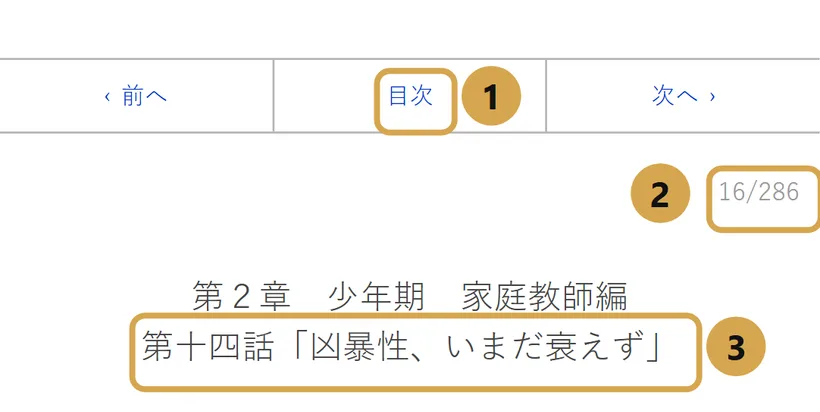
When you search a chapter list by number, try both styles: written-out numerals such as 第十四話 or 第二百一十三章, and digits such as 第14話 or 第213章.
If the next chapter is paid on its platform, buying it lets you read it there; it does not turn it into a file. YourTL translates text you are authorized to use. The JJWXC and Ridi guides cover what those two platforms allow.
4. Bring the chapter to YourTL
YourTL does not search for chapters or keep a catalog. Once you have the chapter, YourTL handles the translation and saves it in your own library. Choose the route that matches what you have:
- The chapter page opens without signing in: paste its link with URL import.
- Several openly published chapters: build one EPUB and import them together.
- You can select the chapter text: copy it and use Paste.
- You have the chapter as images or screenshots: use Screenshot import.
The import methods guide lists the limits of each route and the tools that help prepare a file.
Have the next chapter?
Let YourTL translate it so you can keep reading in your own library.
Questions
- What does "raw" mean?
- Readers use "raw" for a chapter in its original language, before translation. On the original platform, it is simply the chapter as the author published it.
- Why doesn't the chapter number match my translation?
- The original may count prologues and interludes as entries, start again at chapter one in each part, or use titles instead of numbers, and a translation does not always count the same way. Use the number to get close, then compare titles with your browser's translation tool. If you are still unsure, translate a short opening passage to check the match.
- Can YourTL find the original chapter for me?
- No. YourTL has no catalog and does not search other sites. You bring the chapter as a public link, an EPUB or TXT file, pasted text, or screenshots, and YourTL handles the translation.
- Is the web novel the same as the published book?
- Not always. A web novel can be revised when it becomes a book, and some books add or change content. Check which version your translation follows before you match chapters.